

Screener Module
The Deepest Screener on the Market
500+ data points across 25,000+ stocks. Tiered depth from beginner to institutional. AI-powered plain-language screening. Real-time options data. Find what you’re looking for without the overwhelm. Explore the hotspots to see what’s inside.
Screener Module
Interactive Guide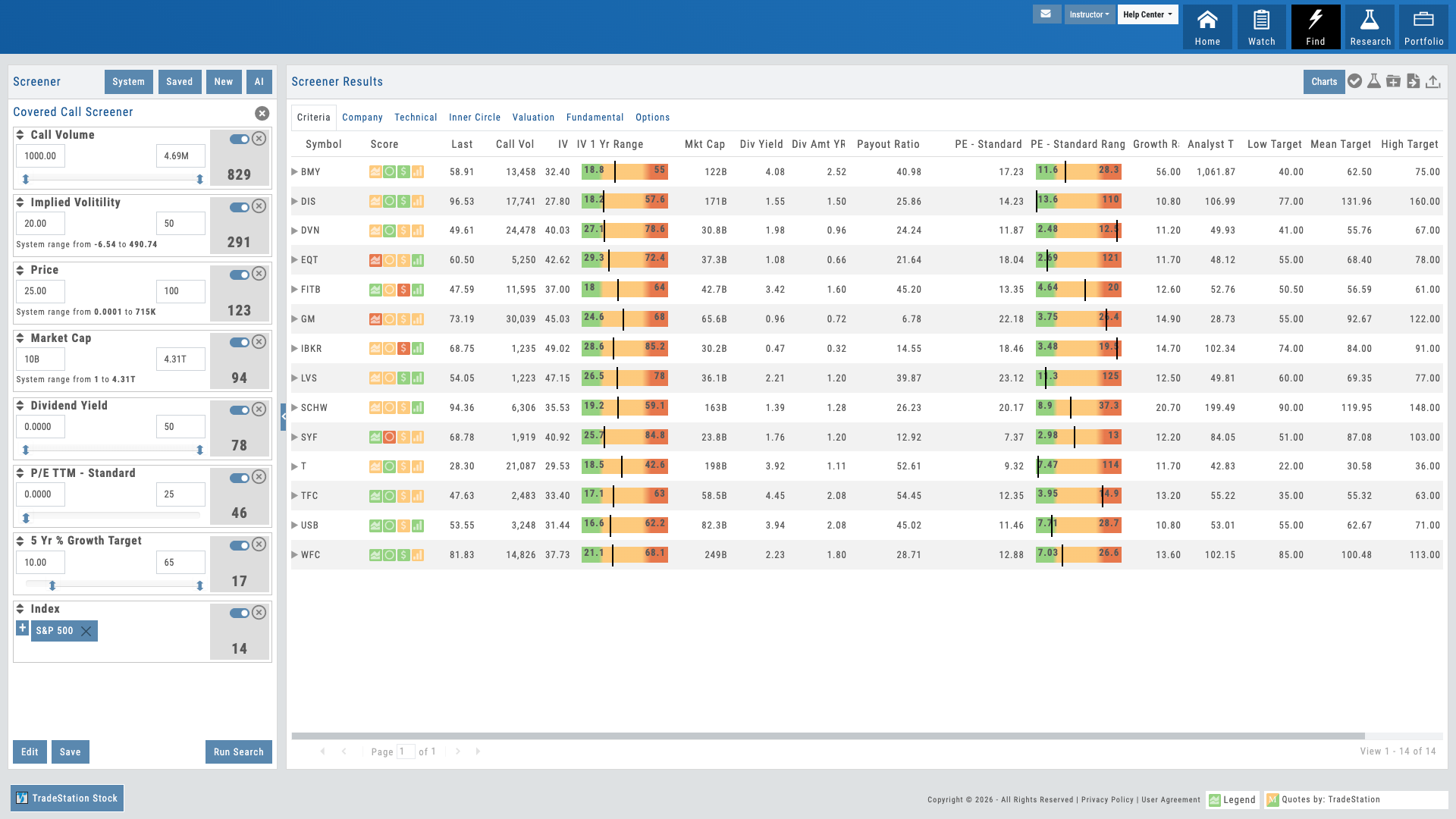
Hover over the pulsing dots to explore features
01 — Core Filtering
500+ Data Points with Progressive Disclosure
Technical, fundamental, and options criteria. Depth without overwhelm.
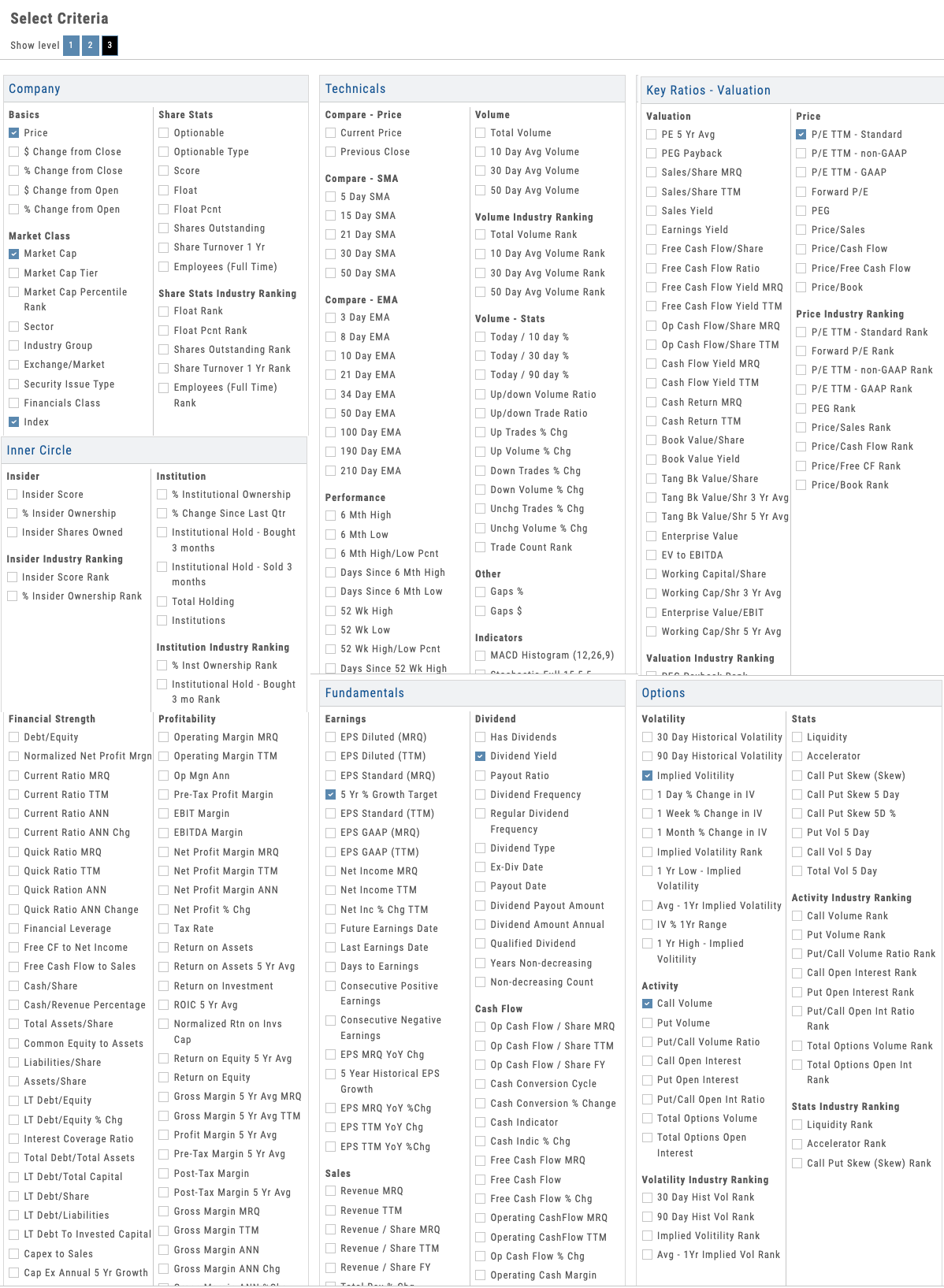
The screener gives you access to 500+ data points across 25,000+ stocks — spanning technical indicators, fundamental metrics, and options-specific criteria. The depth is organized into tiers so users aren’t overwhelmed: Level 1 delivers the most common screening criteria for fast filtering, while Level 3 unlocks the full 500+ data points for advanced users who want institutional-grade precision. Progressive disclosure reveals detail as they drill deeper — start with simple filters like price, market cap, and volume, then go as deep as insider trading activity, analyst sentiment, earnings surprise history, IV percentile, Greeks, and dozens more.
Multiple input types adapt to the data: sliders for ranges, checkboxes for categories, dropdowns for predefined sets, manual entry for exact values. Users control how deep they go. New traders find what they need fast. Advanced traders get the precision they demand. And everything is searchable — type a metric name and the screener finds it.
- Technical criteria: moving averages, momentum, volatility, and more
- Fundamental metrics: earnings, revenue, valuation, insider activity
- Options filters: IV percentile, volume, bid-ask spreads, Greeks
- Progressive disclosure — simple at first, detailed as needed
Screener with technical, fundamental, and options criteria revealed progressively
Natural Conversation
See Filtered Results in Real Time
02 — AI-Powered
Plain-Language Screening
Describe what you’re looking for. AI translates it to filters and returns results.
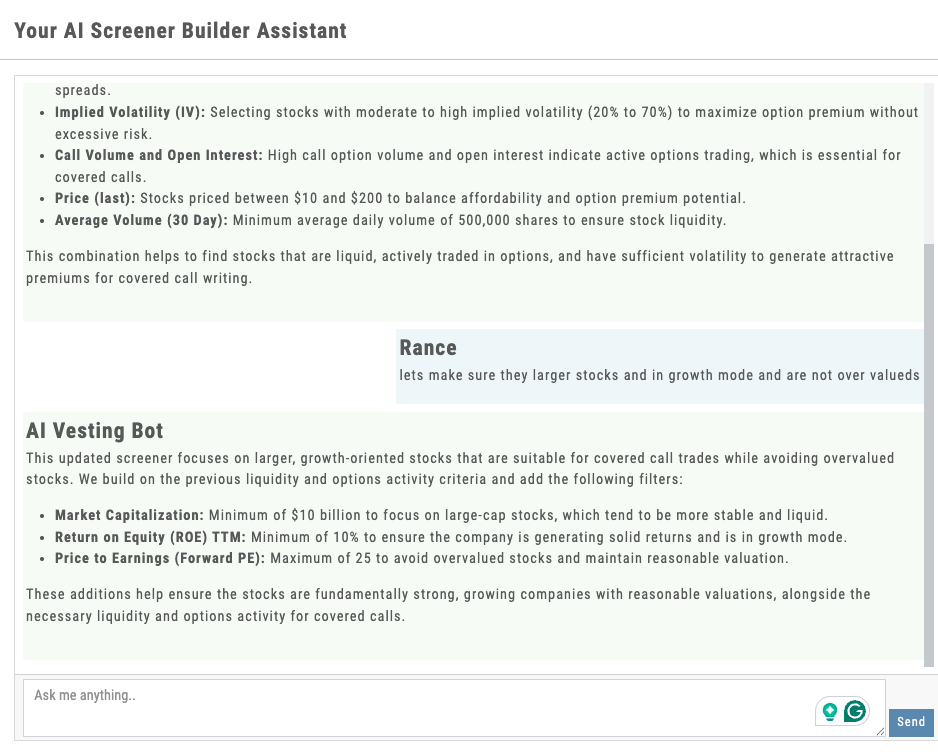
Instead of clicking through a form, just tell the screener what you want: “Find me large cap tech stocks with increasing insider buying and low IV percentile.” The AI understands natural language, translates it into the right combination of filters, and runs the screen instantly. Example queries are suggested, but users write their own — the AI adapts to their style.
This is the wow factor. It makes screening accessible to beginners (no need to understand every metric name) while being faster for experienced traders (who would rather type than click). And it’s transparent — the AI shows which filters it applied, so users learn what their criteria actually mean.
- Conversational interface — type what you’re looking for in plain English
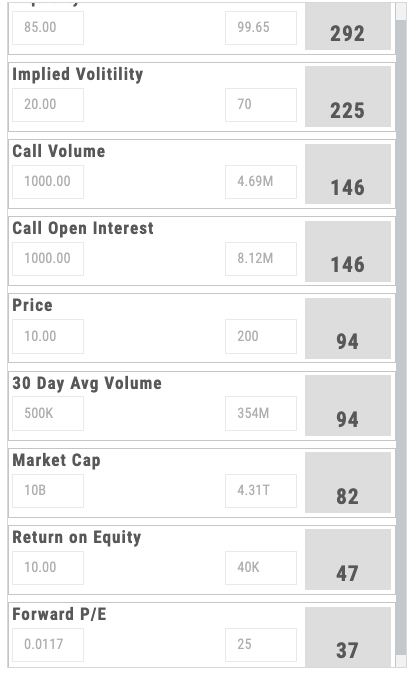
- AI translates natural language to technical filters
- Shows applied filters so users understand the translation
- Suggested example queries for common screening patterns
03 — Options Focus
Real-Time Options Screening
Intraday IV, volume, Greeks — options-specific filters most screeners don’t offer.
Options traders need options data. The screener includes intraday IV percentile, real-time volume, bid-ask spreads, implied move, skew, and all four Greeks — updated throughout the trading day as market conditions shift. Filter for high-volume contracts, elevated IV for shorts, low spreads for entries, positive gamma setups, whatever your strategy demands.
Most screeners treat options as an afterthought. Here, they’re central. Your users can find the highest IV percentile in tech, the lowest IV in earnings plays, options with the widest volume profile, or setups that match their edge. It’s real-time, it’s deep, and it’s built for the people who actually trade options.
- Intraday IV percentile and implied move
- Real-time volume, open interest, bid-ask data
- Greeks — delta, gamma, theta, vega filtering
- Earnings-sensitive IV metrics and volatility smile data
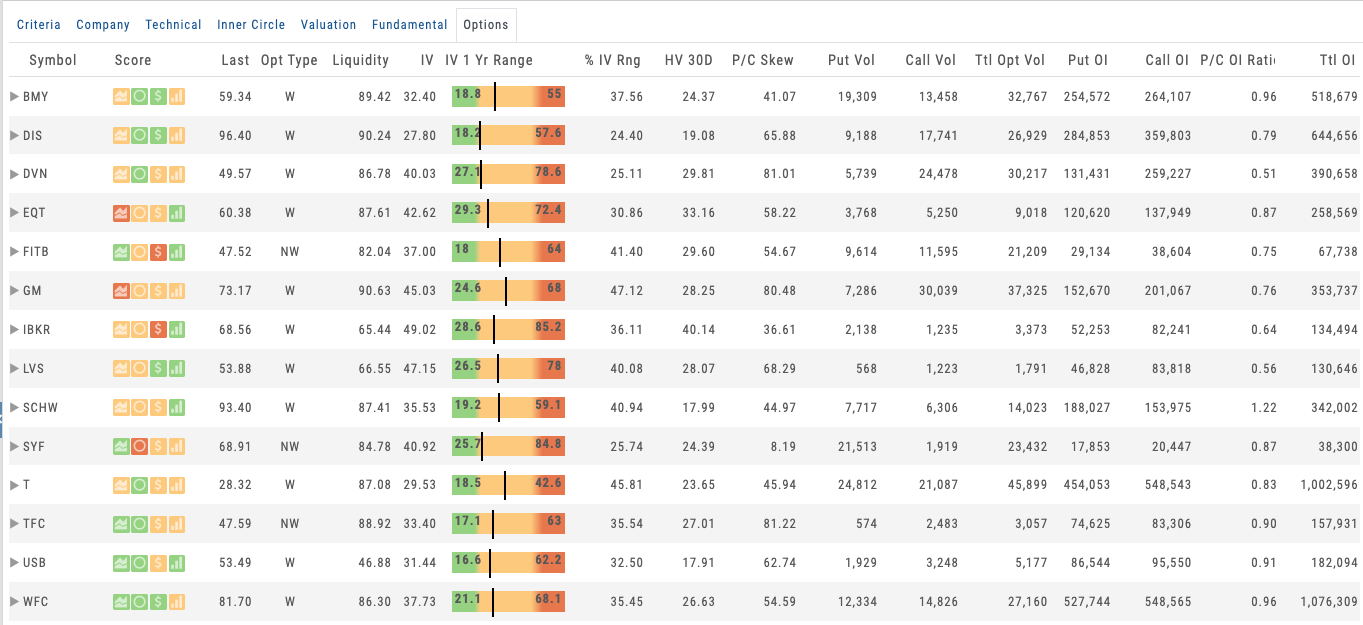
Options screener showing IV percentile, Greeks, and volume columns with real-time updates
Want to Give Your Users the Deepest Screener Available?
500+ data points, progressive disclosure, AI-powered screening, and real-time options data — deployed as part of your branded platform.
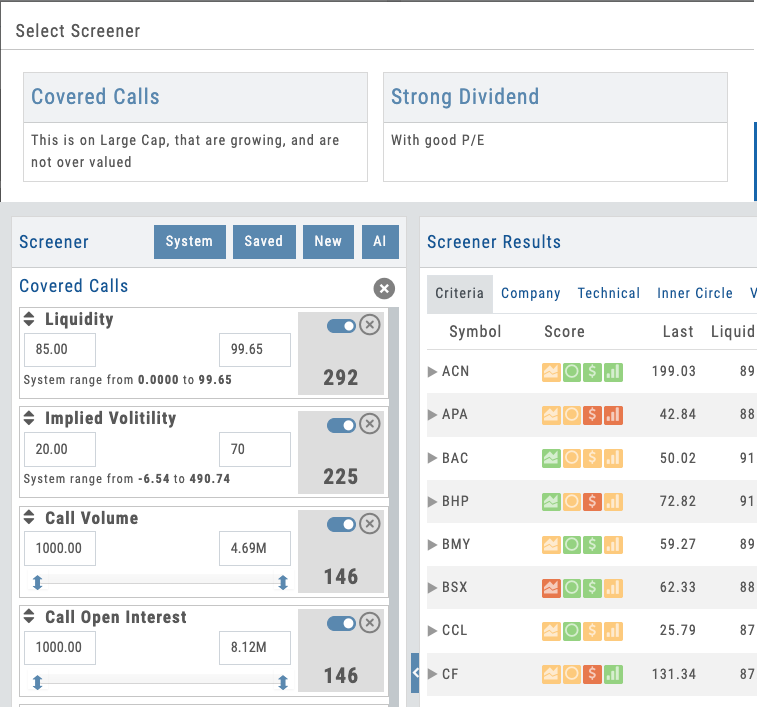
Screen library showing partner-prefixed defaults and user-created screens with save/share options
04 — Partner Control
Save, Share & Pre-Build Screens
Partners create default screens. Students start with curated discovery, not a blank slate.
Every screen can be saved for instant reuse. Users build custom screens and name them — they become part of their personal toolkit. But here’s the partner lever: use the Admin Account to pre-build default screens and push them to every user on your platform.
When a new student logs in, they don’t see a blank screener. They see a curated set of screens you’ve created — perhaps “Earnings Surprises,” “High IV Plays,” “Blue Chip Dividend Growers,” or “LEAPS with Liquidity.” They start with guided discovery. They can modify your screens, save their own variants, and gradually build expertise. Screens are prefixed with [S] for your defaults, so they’re always distinct from user creations.
- Save and name unlimited custom screens for instant reuse
- Admin Account creates default screens pushed to all users
- Share screens with comments — collaborate on strategy discovery
- Prefix-based organization ([S] tags) for defaults vs. user screens
The Deepest Screener, Under Your Name
500+ data points across 25,000+ stocks, tiered depth from beginner to advanced, AI-powered plain-language screening, real-time options data, and Admin Account control — all deployed as part of your branded screening platform. Your users get institutional-grade filtering. You get a retention lever that keeps them coming back.
A Video Built for Your Business
Not ready for a call? Tell us about your business and we’ll record a video of the platform built around it — your audience, your asset classes, the tools your members would actually use. No generic demo.
Ask a question
Ask anything about the platform, the partner model, or how a deployment works. A real person answers — no bot, no drip sequence.
Connects to leading brokerages including Schwab, Tradier, and more. See all supported brokers →