

Alerts Module
The Feature That Brings Users Back Every Day
Price, volume, and indicator alerts with offset precision. Apply any alert to an entire watchlist. Add notes so you know exactly what to do when it fires. Set and manage from anywhere in the platform — desktop or mobile. The daily driver for retention.
Alerts Dashboard
Interactive Guide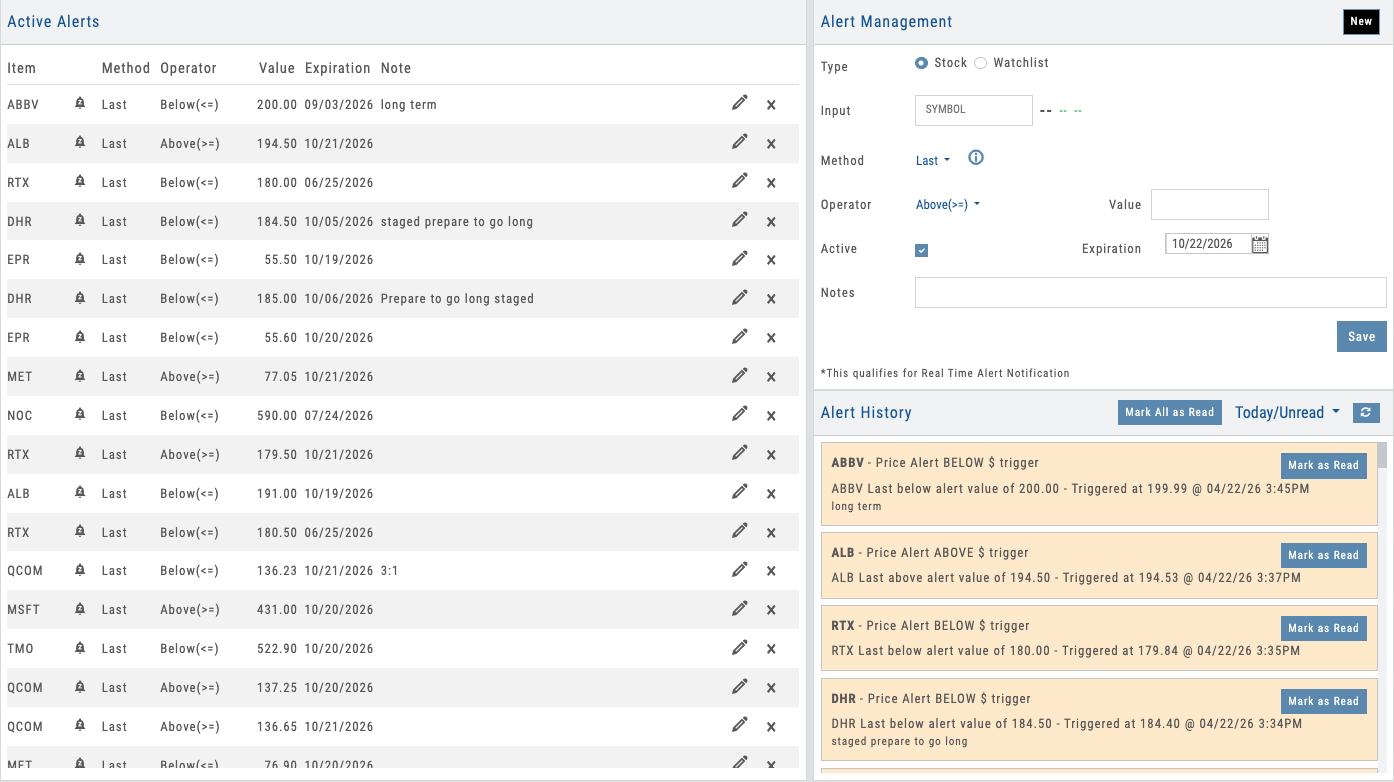
Alerts dashboard with multiple alert types, status indicators, and real-time tracking
01 — Alert Types & Precision Controls
Price, Volume & Indicator Alerts with Offset Precision
Set alerts on price levels, volume thresholds, or any of dozens of technical indicators — each with optional offset controls for precision timing. Apply any alert across an entire watchlist in one click.
Most platforms limit alerts to price: “notify me when SPY crosses 450.” iVest+ goes much further. Set alerts on price levels, volume spikes, moving average crossovers, Bollinger Band breaks, Keltner Channel touches, 6-month highs/lows, 52-week highs/lows, and more. Every alert type supports offset controls — set a 52-week high alert with a $0.50 offset to get notified just before the breakout, not after. And every alert can include a note, so when it fires, users see exactly what they planned to do — no scrambling to remember the thesis.
The real power is watchlist-level alerts. Apply any alert type to an entire watchlist: “notify me when anything on this watchlist hits a new 52-week high.” One setup monitors dozens of symbols. Each stock on the watchlist shows whether an alert is set and whether it’s fired, keeping users in context without navigating away.
- Price alerts — absolute levels, percent moves, gap detection
- Volume alerts — volume spikes and threshold breaks
- Indicator alerts — MA crossovers, Bollinger Bands, Keltner Channels, 6-month and 52-week highs/lows
- Offset controls — precision triggers like 52-week high minus $0.50
- Alert notes — attach your planned action so it’s right there when the alert fires
- Watchlist alerts — apply any alert across an entire watchlist; see set and fired status per stock
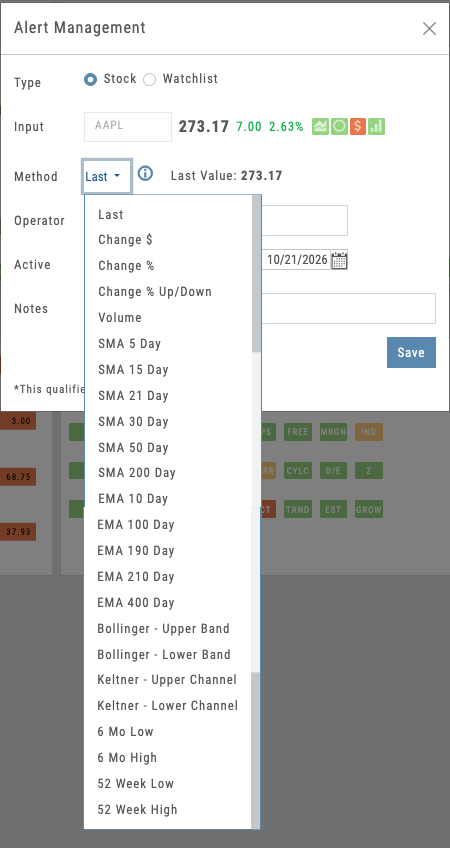
Alert builder with price, volume, and indicator options plus offset controls
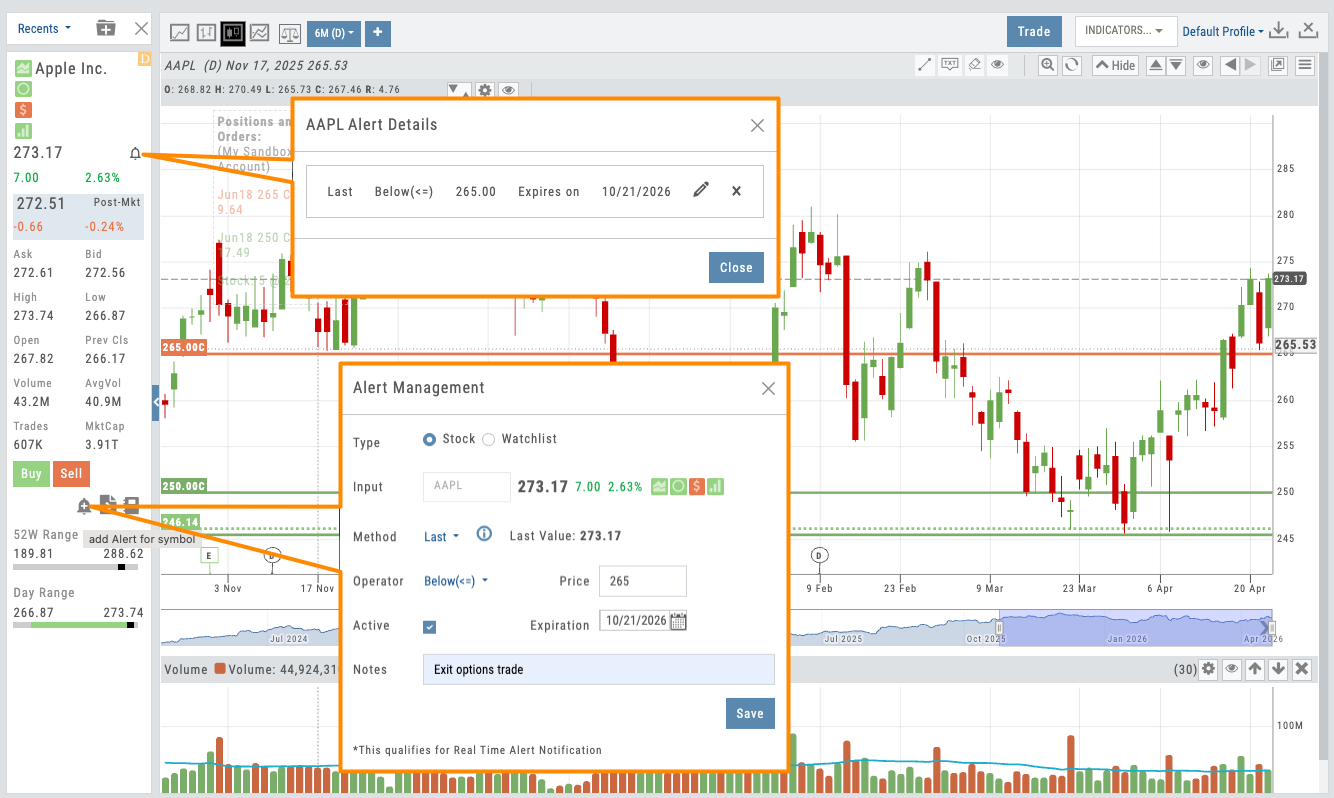
Alert creation from chart, watchlist, and research — manage from anywhere
02 — Quick Setup
Set and Manage Alerts from Anywhere
Set alerts from anywhere in the platform — charts, watchlists, research. Manage them in place. Works on desktop and mobile.
Alerts aren’t locked behind a dedicated page. Create and manage them from the chart, the watchlist, the research dashboard — wherever your users are working. On a chart, click a price level and an inline builder appears. On a watchlist, apply an alert across every symbol in one step. When an alert fires, the bell icon shows exactly what triggered — click to review your note, edit the alert, or reset it, all without navigating away.
The same experience works on mobile. Users create and manage alerts from the iOS or Android app just as easily as desktop. No friction, no context switching — which means more alerts created and more engagement loops triggered.
- Set alerts from charts, watchlists, research — anywhere in the platform
- Click price level → alert builder appears inline
- Click the bell icon on any fired alert to see what triggered
- Edit and manage alerts in place — no separate alerts page required
- Full alert creation and management on mobile (iOS and Android)
Want a Built-In Retention Engine for Your Platform?
Price, volume, and indicator alerts with offset precision, alert notes, and watchlist coverage — deployed as part of your branded platform.
03 — Alert History & Engagement Loop
Recently Triggered Alerts Drive Action
Alert history shows recently triggered alerts with one-click access to research, charts, and trading tools.
When an alert triggers, it’s not the end — it’s the beginning. Push notifications hit the user’s mobile device and appear in-platform simultaneously, so nothing gets missed. The alert shows the condition that fired, the note the user attached, and one-click access to the chart or research dashboard.
This is the engagement loop in action. Alert → push notification → open platform → review note → act. For partners, every triggered alert is a moment when users are primed to engage. The bell icon across the platform makes fired alerts instantly accessible — and watchlists visually distinguish which stocks have triggered, keeping the workflow tight.
- Push notifications to mobile device + in-platform alerts simultaneously
- Bell icon shows fired alerts — click to see exactly what triggered
- One-click navigation to chart, research, or trading tools
- Fired alerts visually distinguished on watchlists
- Alert history with timestamps, conditions, and engagement tracking
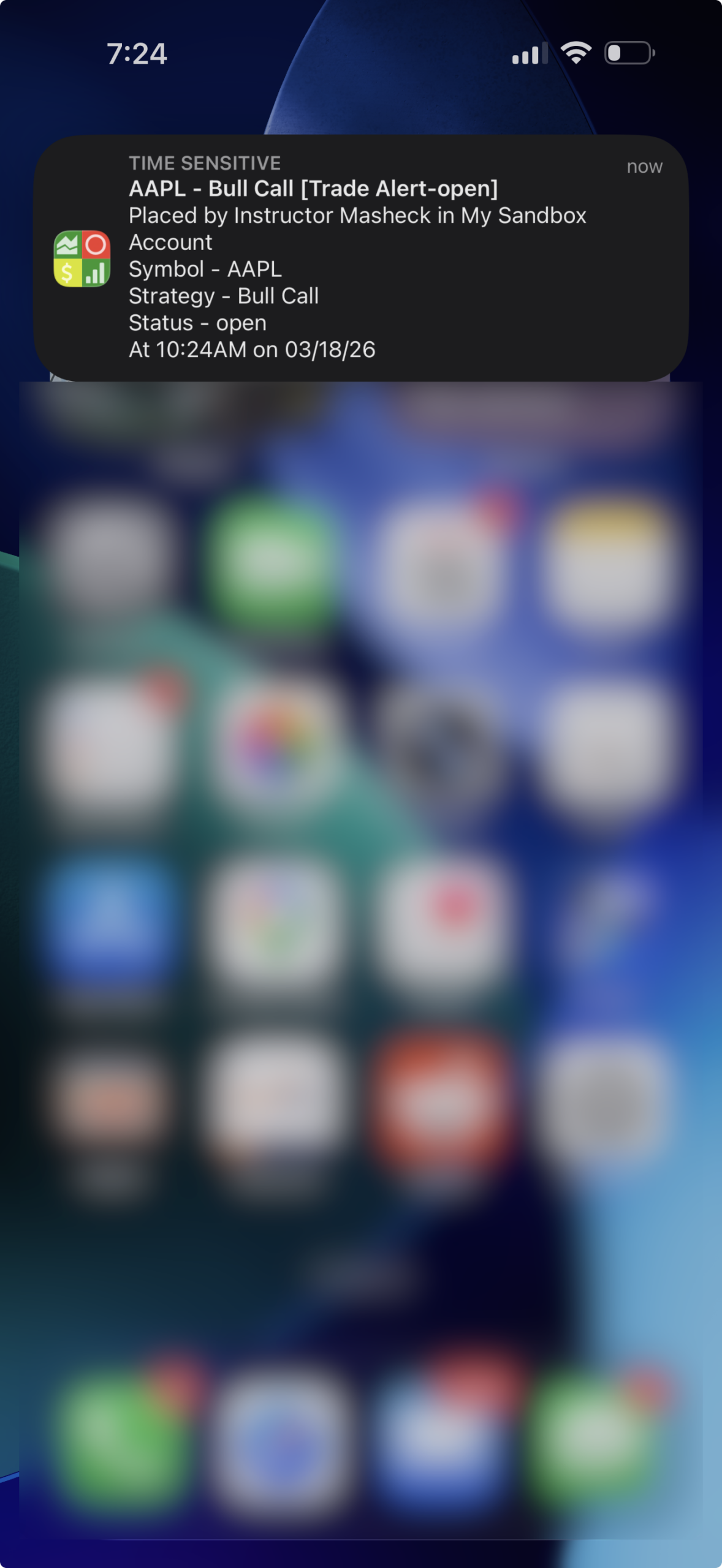
Alert history panel showing triggered alerts with navigation to chart and research
Daily Engagement Under Your Brand
Price, volume, and indicator alerts with offset controls, alert notes, and watchlist coverage. Set from anywhere. Manage in place. Push notifications on every trigger. All deployed as part of your branded platform — a proven retention engine that brings users back every day.
A Video Built for Your Business
Not ready for a call? Tell us about your business and we’ll record a video of the platform built around it — your audience, your asset classes, the tools your members would actually use. No generic demo.
Ask a question
Ask anything about the platform, the partner model, or how a deployment works. A real person answers — no bot, no drip sequence.
Connects to leading brokerages including Schwab, Tradier, and more. See all supported brokers →