

Your Platform. Your Rules.Full Customization, Zero Compromise.
White-Label Means More Than a Logo Swap
Most white-label platforms let you change a logo and pick a color. iVest+ gives you control over what your users see, how they experience every module, and what content greets them on day one. Then it lets you keep updating that experience in real time — so your platform evolves with your business.
Across Every Screen
Choose to Deploy
Live Dynamic Content
In Your Name
You Control
Brand Identity & Theming
Your platform should look and feel like it was built by your team. iVest+ lets you apply your brand identity across every screen — logo, color palette, typography, and theme — so your users never see anything that doesn't belong to you. From the login screen to the chart workspace to the mobile app, it's your brand, consistently. Need different tiers? Deploy multiple levels of the platform — a core package for newer traders and a full suite for advanced members — each with its own module set and feature access.
- Your logo on every page, header, and loading screen
- Branded dark and light themes — plus additional theme options
- Your own domain — users never see ivestplus.com
- Branded iOS and Android apps published under your name in the App Store and Google Play
- Custom favicon, page titles, and metadata
- Multiple platform tiers for different subscription levels
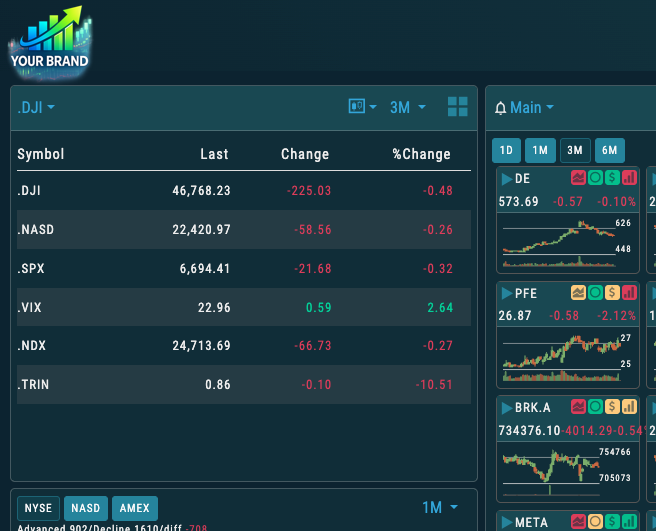
Dashboard | Chart | Research | Options | Journal
Your colors. Your fonts. Your domain.
Every screen says you.
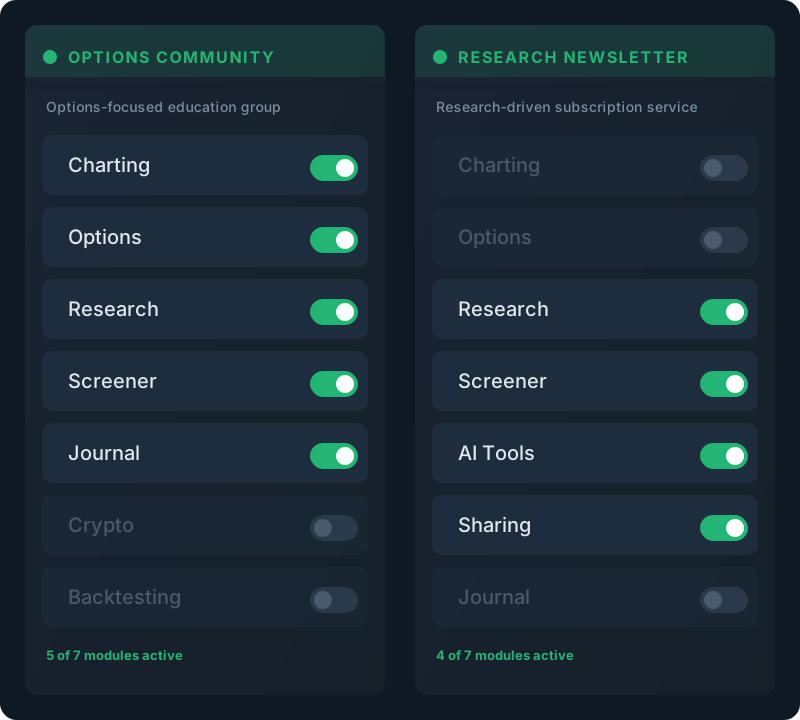
✓ Charting ✓ Options ✓ Research
✓ Journal ✓ Screener ✓ AI Tools
○ Backtesting ○ Crypto ○ Sharing
Toggle modules on or off. Different tiers can have different modules.
Module Selection
Not every audience needs every tool. iVest+ lets you select which modules appear in your platform. Focus on charting and options for an options-first community? Turn off crypto and backtesting. Running a research-driven newsletter? Lead with the screener, research dashboard, and AI tools. You decide what your users see — and you can change it anytime. If you offer multiple subscription tiers, each tier can have its own module set and scan library.
Scan Customization
Choose which scans from the full library are available to your users — Beyond selection, we can build custom scans exclusive to your platform — proprietary screening criteria coded to your specifications and available only to your users. You can also maintain your own curated lists that appear as scan results, giving you a hands-on way to surface specific opportunities to your community.
- Scan selection — choose from the full scan library for your users
- Custom scan development — we build proprietary scans to your exact specifications
- Partner-maintained scan lists — curate and update your own lists that show as scan results for your users
- Scan favorites — pre-select the most relevant scans so users see them immediately
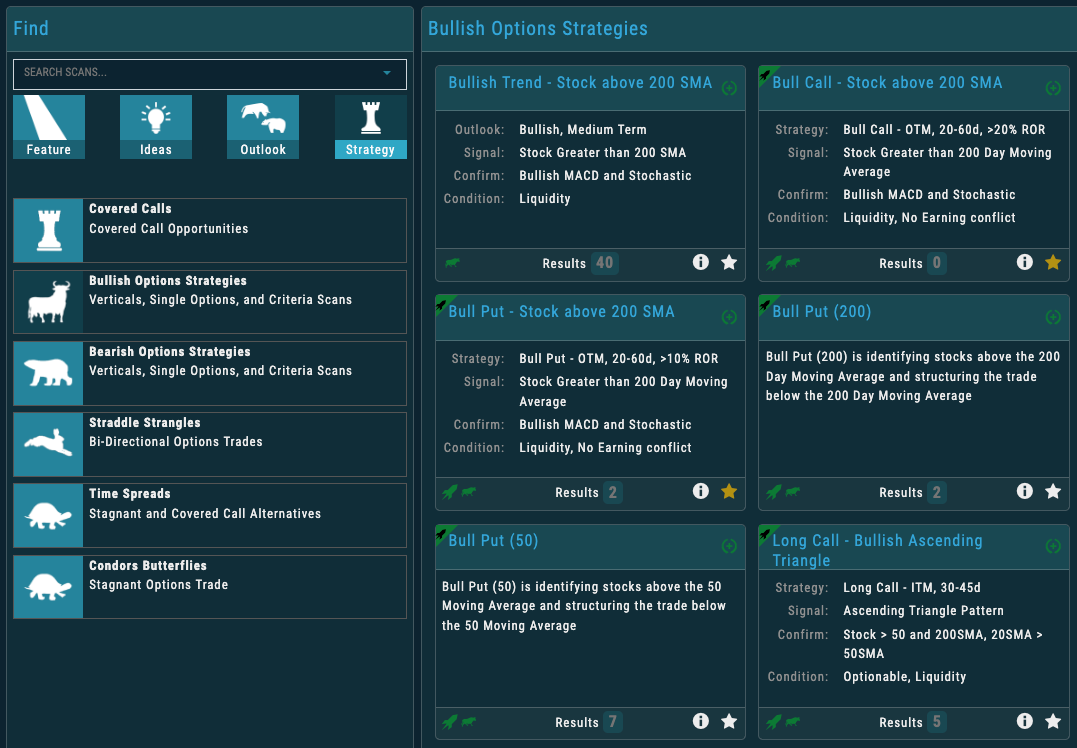
✓ Select from the full scan library ✓ Custom scan development ✓ Partner-curated lists
Your scans. Your criteria. Your users see what you choose.
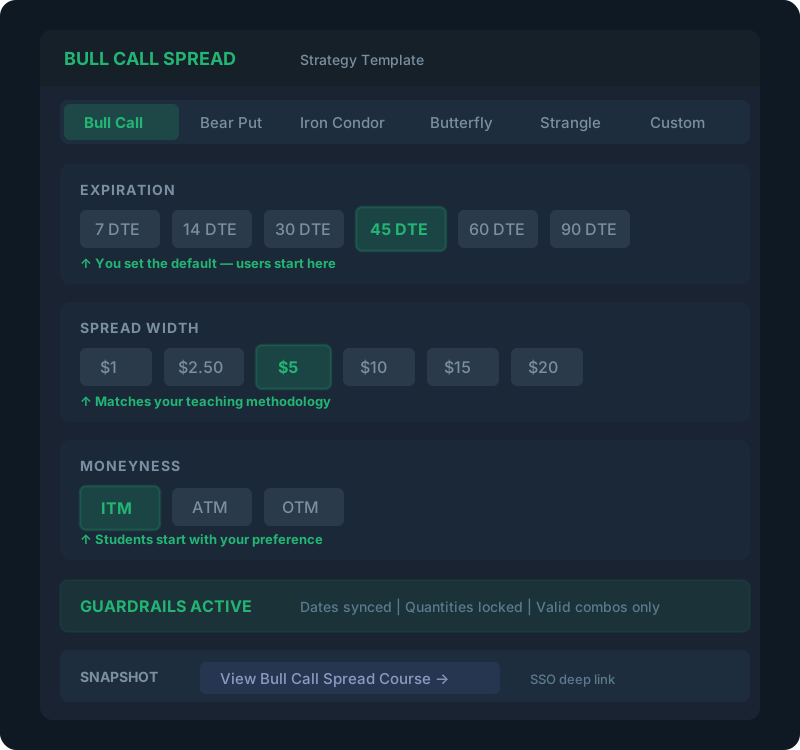
Bull Call Spread
Default DTE: 45 days
Default spread: $5 wide
Moneyness: ITM
Every strategy template. Your defaults. Your methodology.
Options Strategy Defaults
Define the default parameters for the 20 options strategy templates to match your teaching methodology. Control the default days to expiration, spread width, moneyness, and other parameters for every strategy. When a user opens a Bull Call Spread or an Iron Condor, they start with the settings you've chosen. You can also customize the educational content within each strategy's Snapshot — including links directly to your own courses or training materials. If you use the same authentication system or SSO, users click through to your content seamlessly.
- Strategy parameters — set default DTE, spread width, moneyness for every template
- Education content links — connect each strategy’s Snapshot to your training materials
- SSO deep links — users click through to your specific course content about that strategy
- Custom chain views — configure 2 custom options chain views with your preferred fields
Trade Alerts & Delivery
The platform's trade sharing, staging, and publishing capabilities turn iVest+ into a live trade delivery system. When you stage a trade, users receive a push notification on their phone or browser. One tap opens the trade details. Another tap lets them place it with their broker. From notification to execution in seconds — making it the foundation for trade alert services, newsletter delivery, and live classroom instruction.
Trade Staging
Stage a trade and it appears in every user’s Staged Trades area, ready to place with their broker. Push notifications alert users instantly on mobile and desktop. Dotted trade lines appear on their charts showing entries, stops, and targets.
Trade Sharing
One-to-one sharing lets users share trades with each other using a secure, revocable digital key. One-to-many sharing lets an instructor share with an entire class via a code. You control which sharing features are enabled.
Trade Publishing & Subscriptions
Enable public viewable accounts for specific staff. Or offer subscription-based trade alert services directly within the platform — users see an offer page, subscribe through your payment system, and immediately access the content. A complete trade alert business, built into the platform.
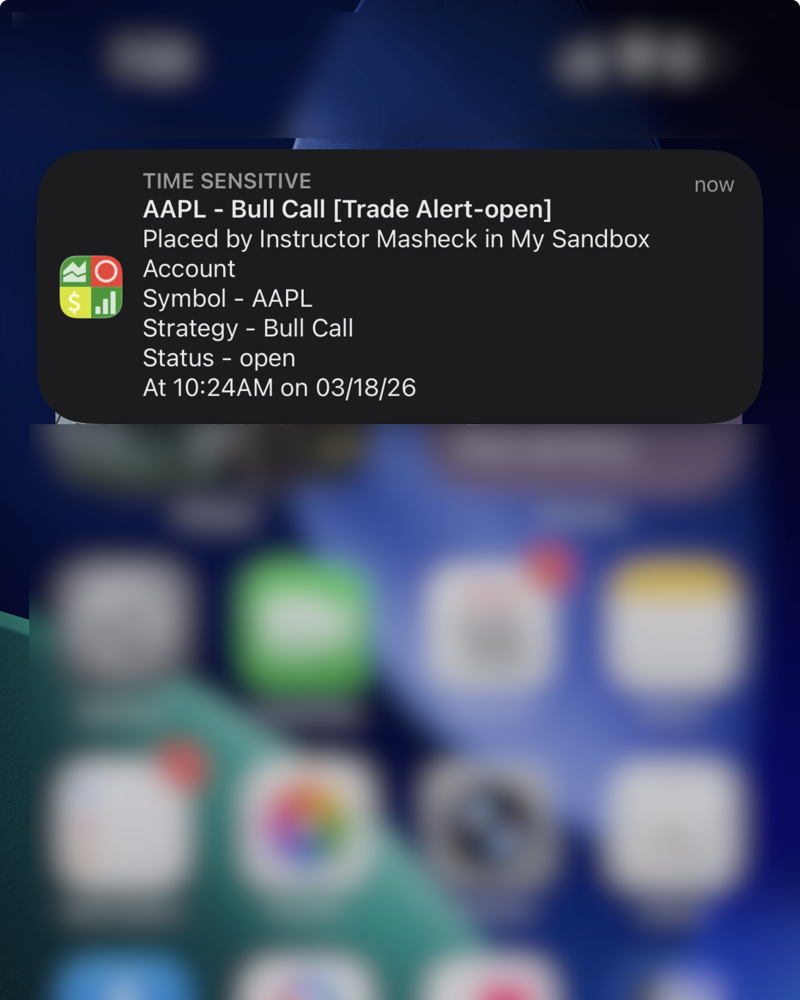
1. You stage a trade → 2. Push notification sent → 3. User taps to view → 4. One tap to place it
Seconds from alert to action.
Mobile. Desktop. Browser.
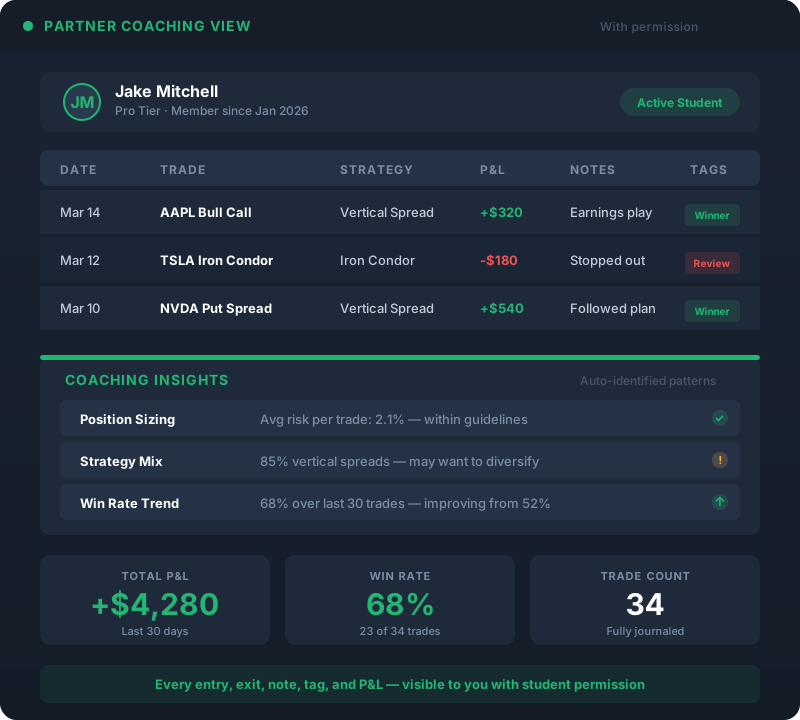
See your student’s:
Trade entries & exits
Automatic strategy identification
P&L by trade and over time
Notes, tags, and adjustments
Life-of-trade history
With permission. Always.
Coaching & Journal Access
With your users' permission, you can view their complete trade journal — every entry, exit, adjustment, note, tag, strategy identification, and P&L calculation. This transforms the journal from a personal record into a collaborative coaching platform. You see exactly what your students are doing, how they're performing, and where they need guidance. No screenshots over email. No manual reporting. Just real data, in context, ready for a coaching conversation.
— What Sets You Apart —
Beyond Setup: Your Ongoing Controls
Everything above is configured once during setup. What follows is different — these are live controls you use every day to shape your platform. The out-of-the-box experience defines what every new user sees at first login. Dynamic content lets you update watchlists, screeners, and chart profiles in real time — change it once, and every user sees it instantly. This is where your platform stops being a static product and becomes a living extension of your business.
Partner ControlThe Out-of-the-Box Experience
The first thing a new user sees sets the tone for their entire experience. With iVest+, you define that first impression. When a new account is created, it inherits the launch settings you've configured — so every user starts with your watchlists, your chart setups, your scan favorites, and your preferred theme. No blank screens. No “where do I start?” confusion. Just a platform that feels ready, curated, and intentional from the moment they log in. Users can personalize anything they want from there — but they start with your foundation.
- Theme — set the default dark or light branded theme for first launch
- Watchlists — pre-load the tickers your community follows (at least 2 recommended)
- Chart profiles — define chart types, indicators, colors, timeframes, and periodicity settings
- Custom page layout — set the dashboard arrangement users see on first login
- Scan favorites — mark the scans most relevant to your audience so they appear immediately
- Screeners — create example screeners so users understand the capability from day one
- Options chain views — configure 2 custom views for the call/put chain with your preferred fields and order
- Chart colors and tooltips — set primary chart colors that look great in both light and dark themes
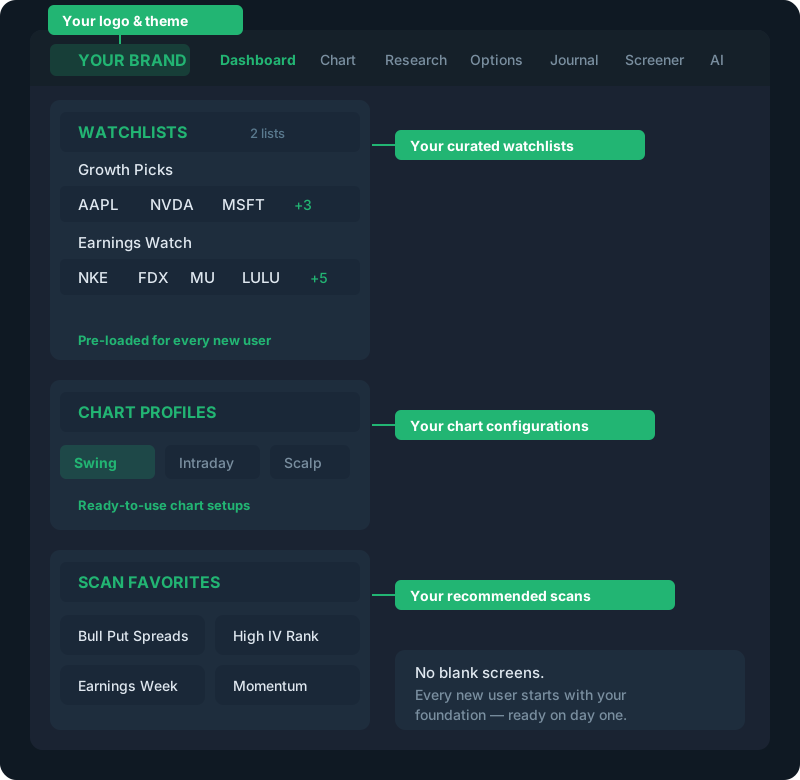 ✓ Your branded theme ✓ Your curated watchlists ✓ Your chart profiles
✓ Custom page layout ✓ Scan favorites ✓ Example screeners ✓ Options chain config
Everything configured. Nothing left to chance.
Users can personalize from here — but they start with yours.
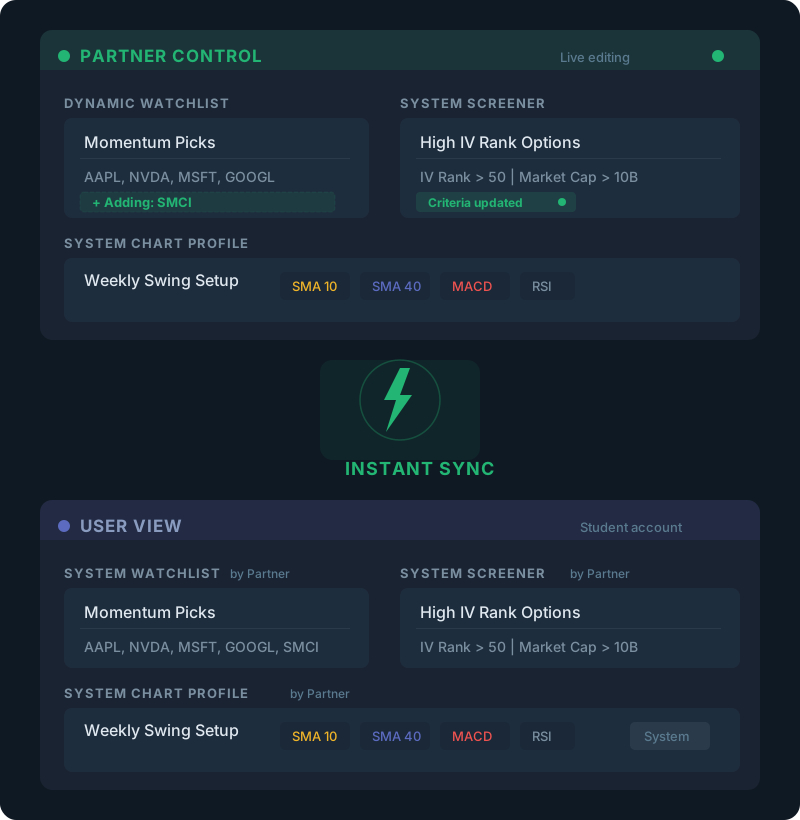
Watchlists — curate and update anytime
Screeners — system-level, always present
Chart Profiles — create or change instantly
Watchlist Views — define the data columns users see
Change it once. Every user sees it immediately.
Partner ControlDynamic Partner Content
Out-of-the-box settings define the starting point. Dynamic content gives you ongoing, real-time control. When you update dynamic content, the change is immediately reflected for every user — no waiting, no re-provisioning. This is how you keep the platform aligned with what you're teaching, trading, and recommending right now.
- Dynamic watchlists — curated lists you manage and update for your community. Users see them under “System” and they change the moment you update them
- System screeners — screeners you control that are always present for users. Unlike out-of-the-box screeners, users can’t delete these — they’re your permanent toolkit
- System chart profiles — chart setups you control dynamically. Users can view and use them, but any edits must be saved as a personal copy. You can create or update profiles at any time
- Watchlist views — define the data columns and layout your users see in their watchlist tables. Control what information is front and center
It's Not White-Label. It's Yours.
Customization isn't a feature — it's the foundation of how iVest+ works for partners. From the theme on first launch to the dynamic content you update in real time to the custom indicators built exclusively for you — everything is designed to feel like it came from you. Because from your users' perspective, it did.
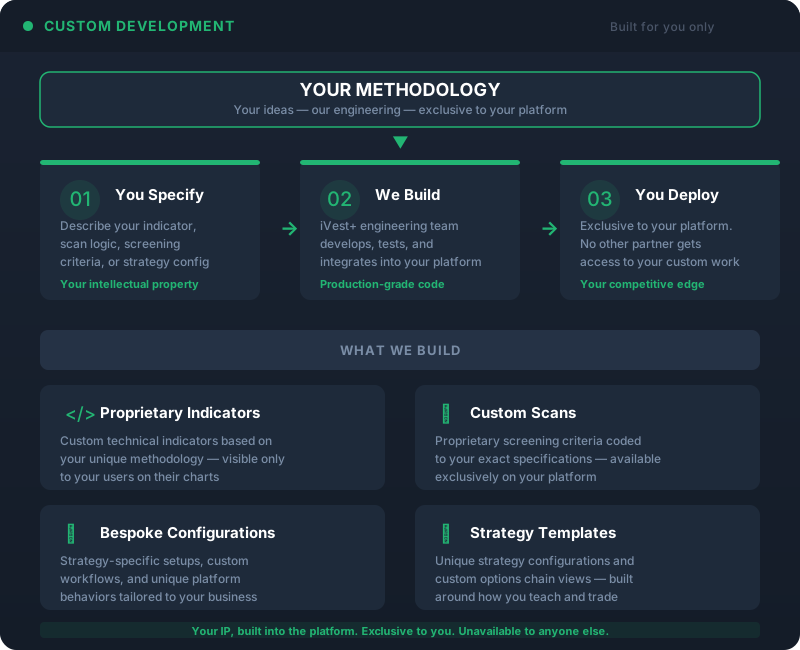
Proprietary indicators
Custom scans
Bespoke screening criteria
Strategy-specific configurations
Your IP, built into the platform.
Custom Development
Need something that doesn't exist yet? We build it. Whether it's a proprietary indicator based on your methodology, a custom scan with specific screening logic, or a bespoke configuration that requires development work — we offer custom development to extend the platform for your specific needs. Your custom features are exclusive to your platform and unavailable to anyone else.
Optional Add-On
Need More Than the Platform?
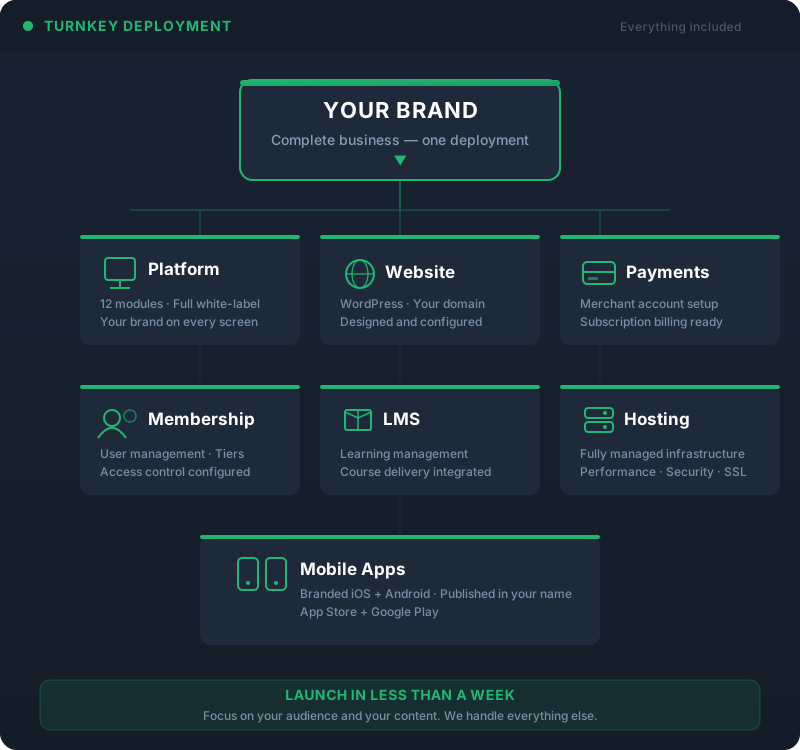
Turnkey DeploymentBusiness in a Box
Ready to See What's Possible?
Every partner deployment is different. Schedule a 15-minute call with our founder to walk through how customization works for your specific audience and business model.