

Partner Success
We Don't Just Deploy — We Partner
From first conversation to thousands of active users, we’re with you at every step. We handle the setup, integrate into your ecosystem, train your team, and then drive user engagement so your platform launches strong and stays strong.
Phase 1
Partner Onboarding
We guide you from signed agreement to live platform. Every partner gets a dedicated onboarding process — no templates, no self-service setup. We do this with you.
01 — Guided Setup
Branding, Modules & Configuration
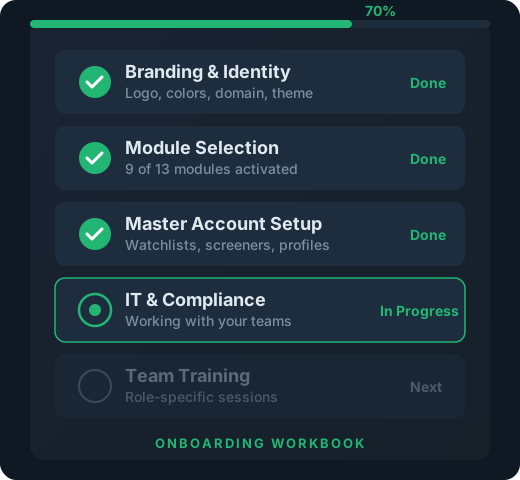
It starts with the Partner Onboarding Workbook — a structured guide that walks through every decision and sets expectations for the process ahead. From there, we work with you hands-on: applying your branding, selecting which modules to activate, and configuring the user experience through your Admin Account.
This isn’t a dashboard you log into and figure out alone. We sit with you, configure it together, and make sure it looks and feels like your platform from day one.
- Partner Onboarding Workbook — structured guide for every decision
- Branding applied to every screen, email, and user touchpoint
- Module selection — activate only what fits your program
- Admin Account configuration — control the user experience
02 — Integration
IT, Compliance & Systems
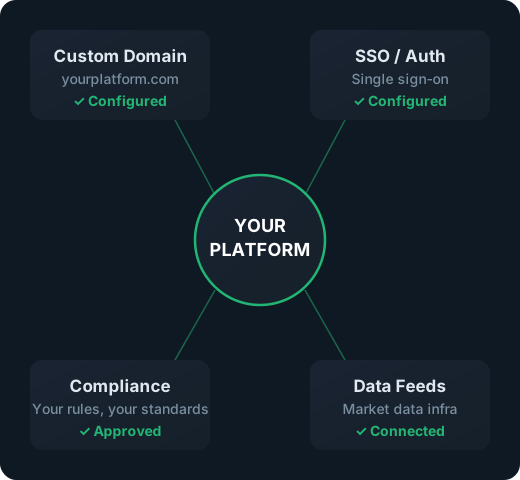
We work directly with your IT team to integrate the platform into your existing systems and company URLs. We work with your compliance team to make sure everything stays within their rules — because if compliance isn’t comfortable, nothing else matters.
The platform lives under your domain, inside your ecosystem, and meets your organization’s standards. Not ours. Yours.
- Custom domain integration — your URL, your platform
- Compliance review — we work with your team until they’re comfortable
- Systems integration — SSO, data feeds, existing infrastructure
- Your rules, your standards — we adapt to your environment
03 — Instructor Buy-In
Built for Front-of-the-Room Success
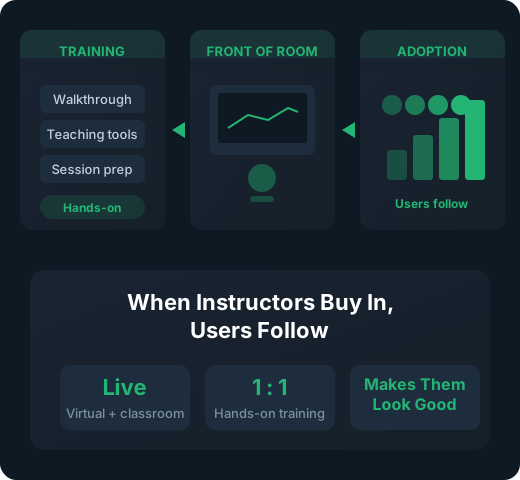
Instructor buy-in is critical for adoption — we know this because instruction is in our DNA. The platform has features specifically designed for front-of-the-room success, whether that’s a virtual classroom or a live event. We make it easy for instructors to teach with the platform and make them look good doing it.
We work directly with your instructors to show them how the platform fits their teaching style. When they see what it can do for their sessions, they become your biggest advocates.
- Features designed for live teaching — virtual or classroom
- Instructor training sessions — hands-on, not slide decks
- Makes instructors look good — tools that enhance their delivery
- When instructors buy in, users follow
04 — Team Training
Training for Every Role
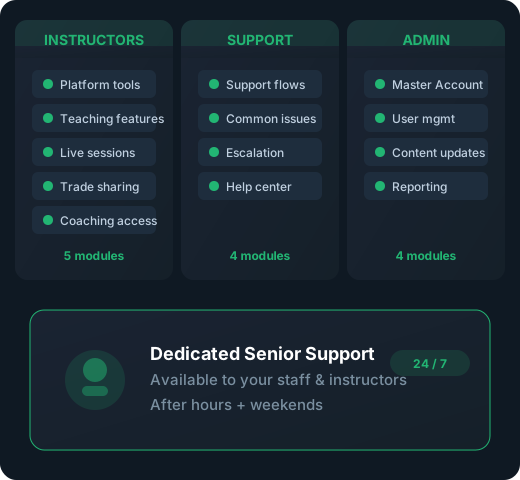
Different teams need different training. Instructors need to know how to teach with it. Customer service needs to know how to support it. Admin teams need to know how to manage it. We run separate sessions for each role so everyone gets exactly what they need.
We also provide a dedicated senior support person available to your staff and instructors — even outside market hours and on weekends — so they have expert backup whenever they’re running events or preparing content.
- Separate training for instructors, customer service, and admin
- Dedicated senior support person for your team
- Available outside market hours and weekends
- Expert backup whenever your team needs it
05 — Content & Curriculum
We Help You Expand What You Teach
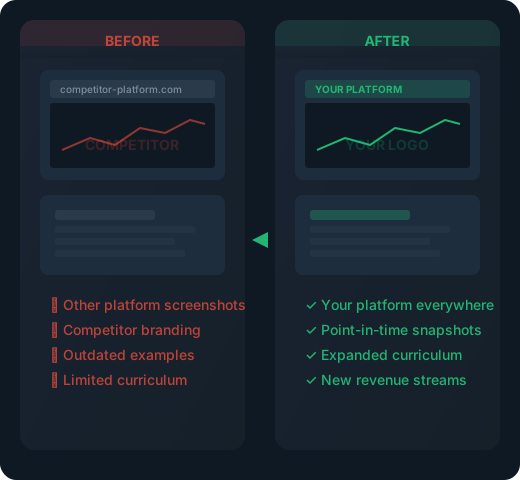
We update your existing materials with screenshots from your branded platform — that chart, that options strategy, that scan you’ve always taught with, now shown in your platform instead of someone else’s. We can even do point-in-time snapshots so the examples match exactly what your instructors are used to showing.
Beyond updating what you have, we help you expand. There’s so much in the platform that many partners find new content opportunities. Our subject matter experts can help expand curriculum, develop new courses, or create special events that produce additional revenue.
- Screenshot replacement — your existing materials, now in your platform
- Point-in-time snapshots — exact matches for teaching examples
- Curriculum expansion with subject matter expert support
- New content opportunities that drive additional revenue
06 — Events & Promotion
We Show Up for Your Launch
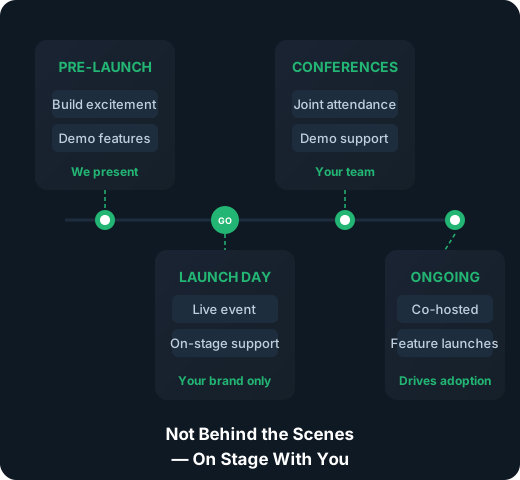
Deploying a platform is one thing. Getting people excited about it is another. We participate in — or even run — webinars to help promote the platform to your user base. We join conferences and symposiums alongside your team. We’re not behind the scenes; we’re on stage helping you sell it.
When your users see the depth of what’s available and the expertise behind it, adoption accelerates. We’ve done this launch process many times and know what moves the needle.
- Co-hosted launch webinars to promote to your base
- Conference and symposium participation
- Experienced at partner launches — we know what drives adoption
- We show up as your team, under your brand
That's Just Getting You Live. Here's What Happens Next.
Once your platform is deployed, we shift focus to driving user adoption and long-term engagement — all under your brand.
Phase 2
User Engagement
We don’t hand over the platform and walk away. We run a continuous engagement engine that drives adoption, educates users, and keeps them coming back — all operating as an extension of your brand.
07 — Email Onboarding
15-Email Drip Sequence
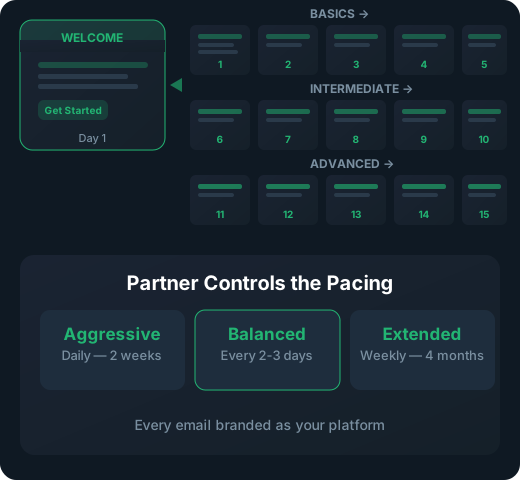
Every new user receives a welcome email and then a 15-email onboarding sequence — spaced however the partner wants. Each email highlights a series of features, getting progressively deeper into functionality. Early emails cover the basics. Later emails introduce advanced tools. By the end, users know what’s available and how to use it.
The partner controls the pacing. Some want daily emails for two weeks. Others prefer weekly over a quarter. The content is the same; the cadence is yours.
- Welcome email — sets expectations and gets them started
- 15 feature-focused emails — progressive depth from basics to advanced
- Partner controls the timing and cadence
- Branded — every email comes from your platform, not ours
08 — Help Center
Branded Help Center & Support
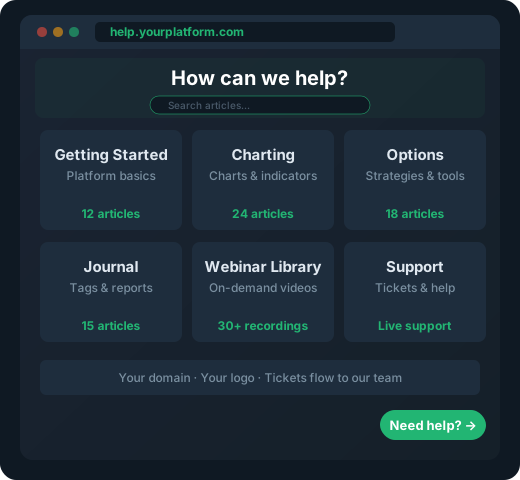
Every partner gets an extensive Help Center under their branded URL — documentation, tutorials, and guides that users can access anytime. A support ticket system is available from the Help Center or directly inside the platform, so users can get assistance without leaving the experience.
All webinar recordings are available on-demand in the Help Center, building a growing library of educational content that users can revisit whenever they need it.
- Branded URL — your help center, your domain
- Support tickets from Help Center or inside the platform
- On-demand webinar library — always growing
- Documentation, tutorials, and guides
09 — Live Webinars
Monthly & Quarterly Webinar Series
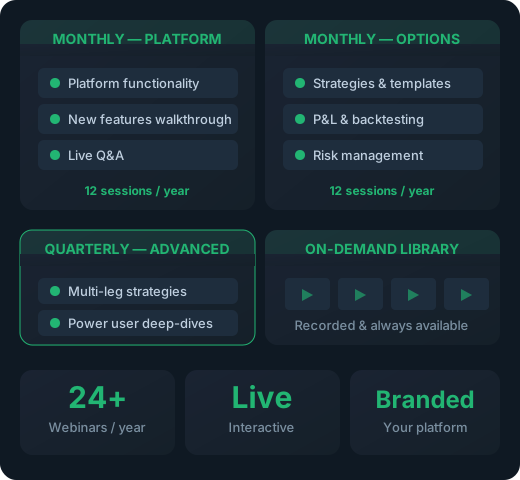
We run a recurring webinar series that keeps users engaged and learning. Monthly sessions cover overall platform functionality and options-specific features. Quarterly sessions dive into advanced options capabilities for power users.
Every webinar is recorded and added to the Help Center’s on-demand library. Users who miss the live session can catch up on their own time.
- Monthly webinar — overall platform functionality
- Monthly webinar — options-focused features
- Quarterly advanced options deep-dives
- All recorded and available on-demand in Help Center
10 — Office Hours
Twice-Weekly Open Sessions
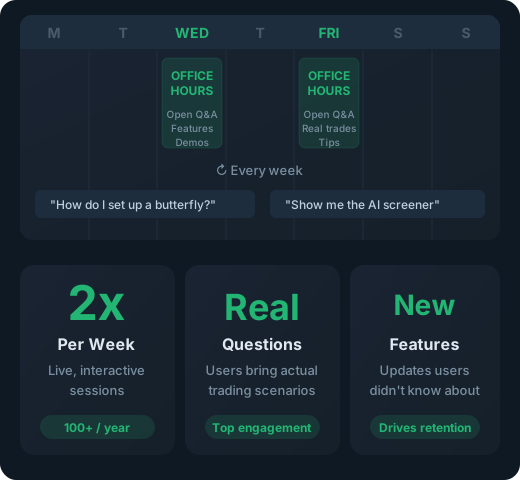
Two times a week, we host open “office hours” webinars where users can ask anything about using the platform. These are live, interactive sessions — not pre-recorded walkthroughs. We also use these sessions to highlight new features and show users what’s been added since their last visit.
Office hours are one of the highest-engagement touchpoints. Users come with real questions about real trades, and they leave knowing more than when they arrived.
- 2x per week — live, open Q&A sessions
- Users ask anything about the platform
- New feature highlights and walkthroughs
- High-engagement touchpoint that drives retention
Your Brand. Our Engine.
In every user communication — emails, webinars, help center, office hours, support tickets — we operate as an extension of your brand. Your users never see us. They see you, backed by a team that’s done this before and knows how to drive adoption at scale.
A Video Built for Your Business
Not ready for a call? Tell us about your business and we’ll record a video of the platform built around it — your audience, your asset classes, the tools your members would actually use. No generic demo.
Ask a question
Ask anything about the platform, the partner model, or how a deployment works. A real person answers — no bot, no drip sequence.